Get a demo

Custom reporting for agencies

Build the exact reports you need

Synergist's advanced analytics tool lets you build bespoke reports, charts, and dashboards from your live agency data and schedule reports to land in the right inbox at the right time.

Build custom agency reports and charts

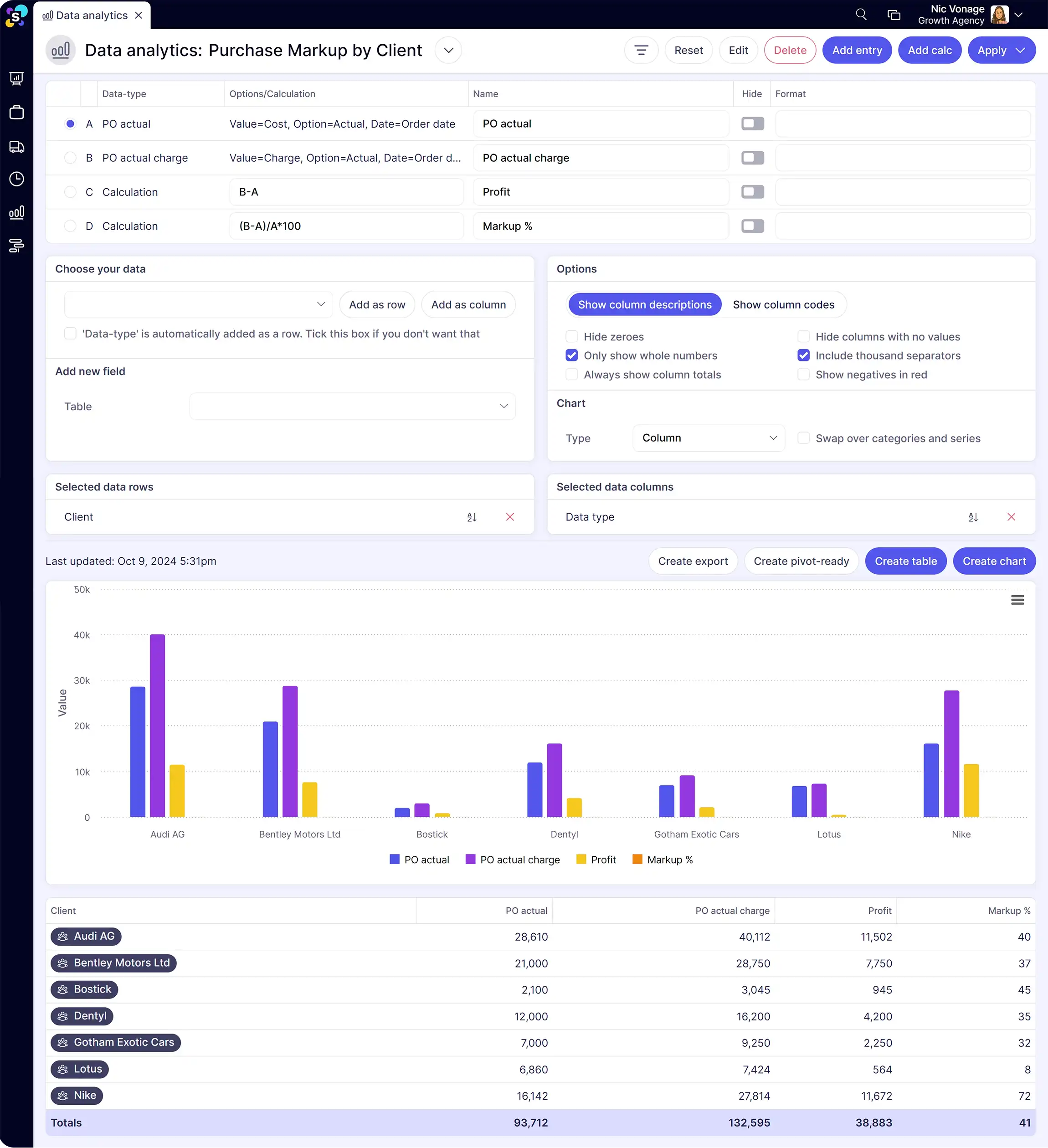
Synergist's analytics tool works like an integrated pivot table for your agency data. Choose your data fields, add filters and date ranges, cross-tab variables, and see the results as tables or interactive charts. Build a report for a specific meeting, a deep dive, or save it for ongoing use.

  • Report on your chosen data using sophisticated filters and date ranges

  • Add multiple data fields, organise into columns or rows, and cross-tab fields to compare variables

  • Use calculations including additions, subtractions, divisions and percentages to show the exact data you need

  • View data in tables or interactive charts to spot comparisons, patterns and trends

  • Create ad hoc reports when your agency needs them, for a meeting, a decision, or a deep dive, and save them for ongoing insights

  • Synergist also includes built-in dashboards and ready-made reports

Create custom dashboards for your agency team

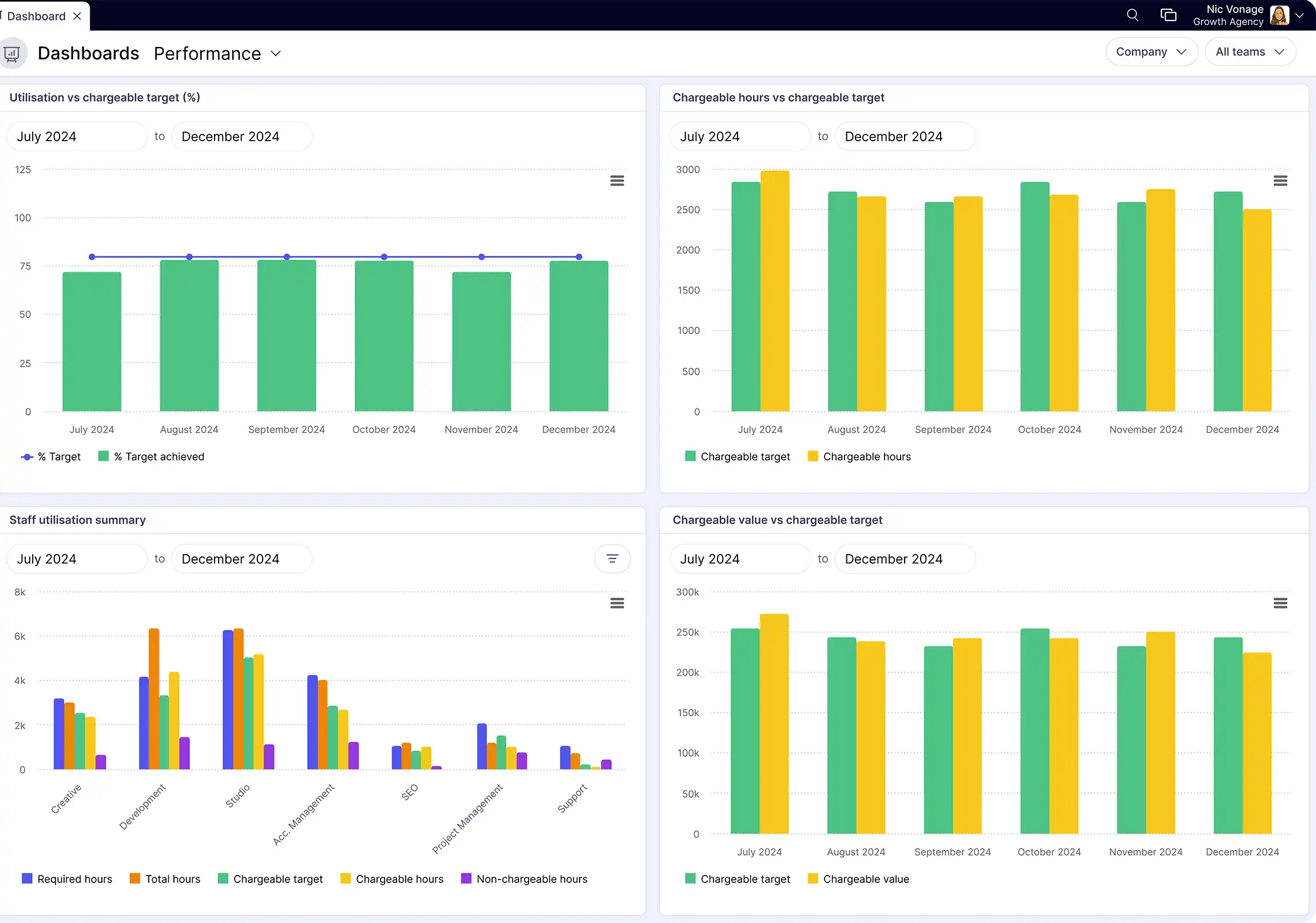
Combine multiple reports and charts into custom agency dashboards using drag and drop. Set up different views by role so agency leadership sees the high-level picture while project managers and finance see the detail they need. Reporting permissions keep sensitive data secure.

  • Combine multiple reports or charts into custom dashboards using drag and drop to customise the layout

  • Set up different views by role so your agency team members only see relevant data, such as their clients or jobs

  • Keep private data secure with advanced reporting permissions

CWA, a marketing agency, uses Synergist's advanced analytics to access real-time data and inform its business strategy.

The detail of the data that’s available and the fact it’s live data is brilliant. This data will help to guide our future strategy of where to focus.

Image of Zoe Wyles
Zoe Wyles Finance and HR Director, CWA

Why not just use Excel or a standalone BI tool?

Excel can do almost anything with data, given enough time. The problem is getting the data into it. You end up exporting from multiple systems, cleaning it, and building the same report every month. By the time it's done, the numbers are already old.

Synergist's analytics tool reports directly from live project data. There's no export, no cleanup, no manual reconciliation. When time is logged or a cost comes in, the report updates. And because it's built into your agency management system, you can cross-tab project data, financial data, and resource data in a single report, which no standalone BI tool can do without integration work.

Want a deeper look? Watch our product tour to see how agencies manage reporting and analytics with Synergist

Share and schedule agency reports automatically

Once you've built a report, Synergist makes it easy to share across your agency. Email reports directly, export to CSV or Excel, download charts as images or PDFs, or schedule regular delivery to individuals or distribution groups. You can also feed report data into other systems via the API.

  • Email reports directly from Synergist to yourself or multiple people on your team

  • Export data as a CSV or Excel pivot-ready file

  • Download charts in different image formats or as PDFs

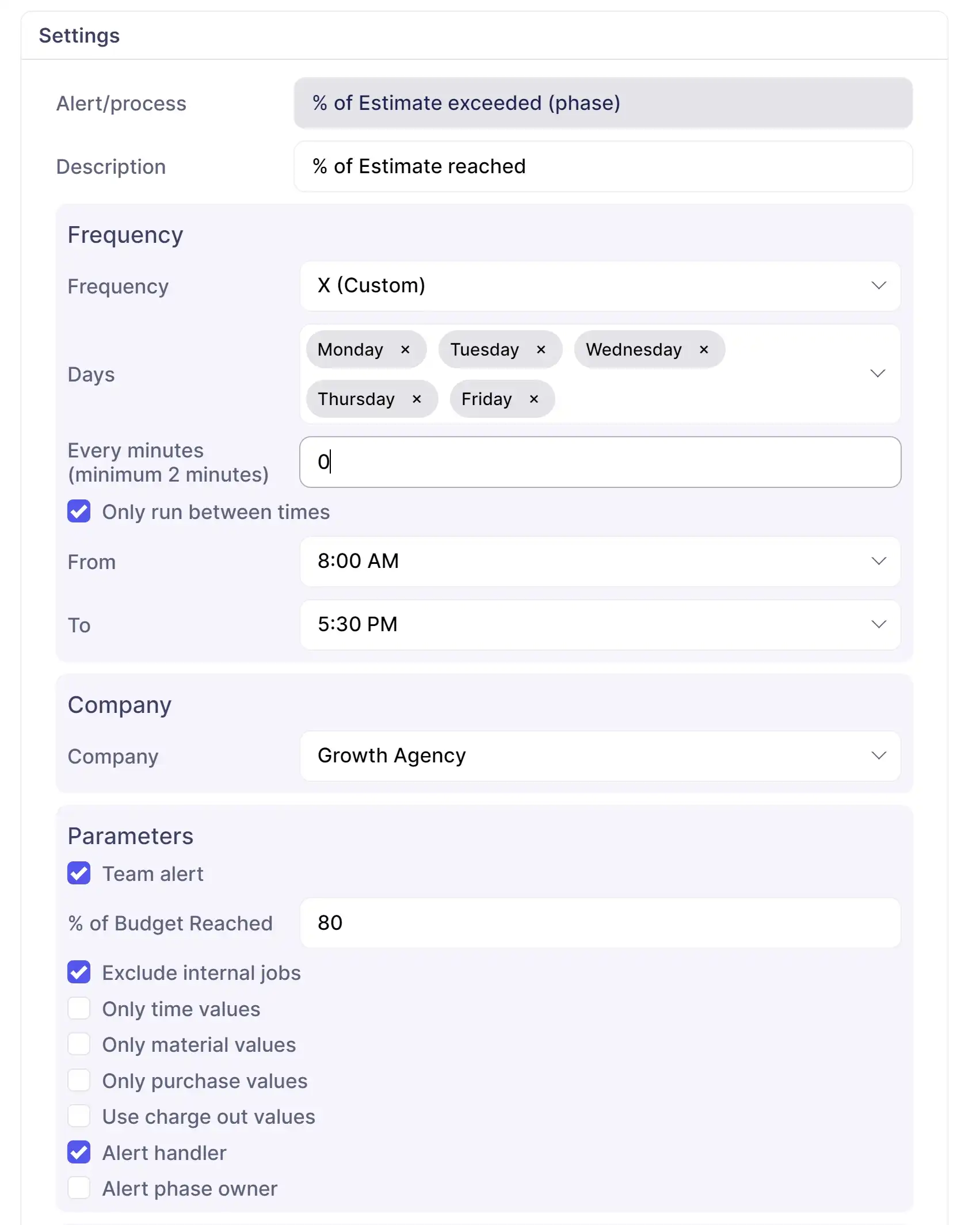
  • Schedule regular reports to be emailed to an individual or distribution group, defining frequency, days, time and format

  • Feed report data into your other systems using the API

Frequently asked questions

What data can I report on in Synergist's analytics tool?

Synergist lets you report on any combination of revenue, costs, profit, utilisation, capacity, opportunities, and activities. You can cross-tab fields, add custom calculations, and filter by client, team, job type, date range, or custom fields.

Can I build custom dashboards in Synergist?

Yes. Synergist lets you combine multiple reports and charts into custom dashboards using drag and drop. You can create different dashboard views for different roles, so leadership, finance, and project managers each see the data most relevant to them.

Can I schedule reports to be emailed automatically?

Yes. Synergist lets you schedule reports to be emailed to individuals or distribution groups at set frequencies, days, times, and formats. You can also export data to CSV or Excel and download charts as images or PDFs.

How is the advanced analytics tool different from Synergist's built-in dashboards?

Synergist includes built-in dashboards for management, sales, performance, and capacity that show key metrics at a glance. The advanced analytics tool goes deeper, letting you build bespoke reports with custom filters, cross-tabs, calculations, and visualisations. Both pull from the same live data.

Have more questions? Drop us an email enquires@synergist.co.uk

Related resources

Agency guides

Agency management intelligence

Business analysis often skips the to-do list, especially when you're too busy working in your business (the fun stuff). But you could be missing out on a game-changer.