
Synergist release notes
In this release:
Synergist v17 | August 26
We're committed to regular product updates every four months. This gives us time to listen to your feedback and make meaningful developments. Every feature in v17 came from conversations with people who use Synergist every day. We listen, we build, we deliver.
What's new in v17...
 Jobs
Jobs
Internal notes on estimate lines
Add internal notes to time, purchase, material and expense lines on an estimate, giving your team somewhere to capture context that shouldn't reach the client, such as why a line changed or an adjustment was made. Notes stay internal and never appear on client-facing quotes.
Delete jobs, phases and stages containing tasks in one step
Deleting a job, phase or stage that contains tasks no longer means deleting each task first. If tasks are the only thing in the way, Synergist prompts for confirmation and removes them automatically as part of the deletion. Hard blockers such as logged time, invoices or purchase costs still prevent deletion, as before.
 Tasks
Tasks
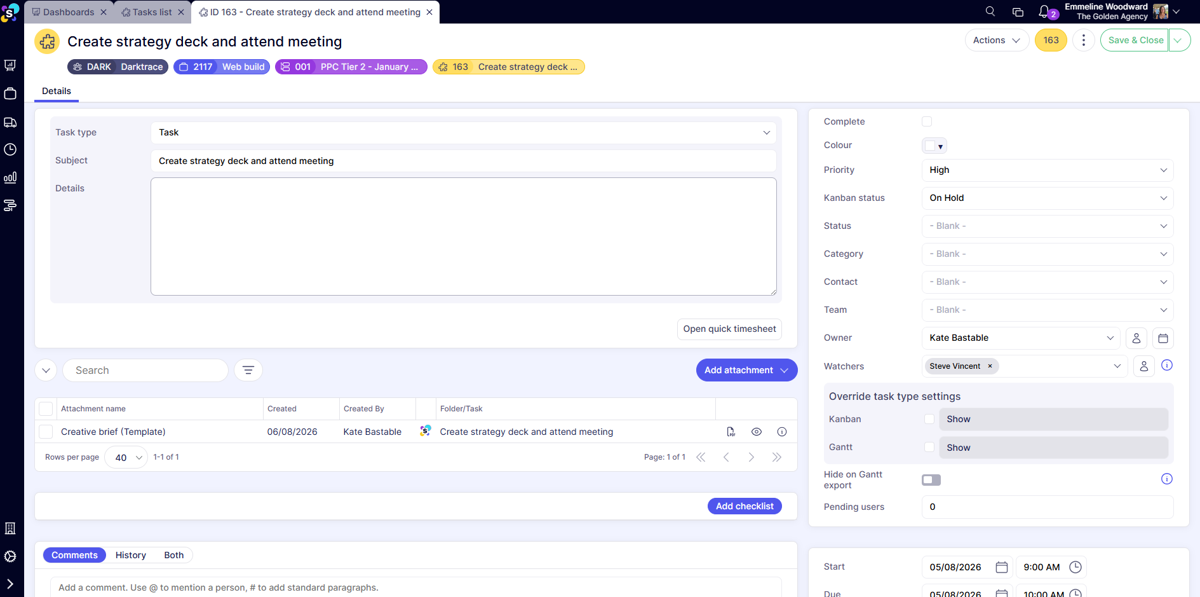
Task attachments moved to the Details tab
Attachments on tasks have moved from their own tab onto the Details tab, sitting below the details box. That's one less click, and less chance of an attachment being missed.
Files can also be added by dragging and dropping them straight onto the task.
Easy editing and deleting on task comments
The edit and delete options on task comments now have their own icons, a pencil to edit and a red X to delete, replacing the previous three-dot menu.
Deleting a comment shows a confirmation prompt to help prevent accidental deletions.
 Timesheets
Freelancer overtime cost rates
Agencies using freelancer timesheets can now set separate purchase order cost rates for overtime (OT1 and OT2) on each freelancer resource record. When overtime hours are converted to purchase orders, Synergist applies the correct rate to each split PO line automatically. Particularly useful if you run a large freelance workforce.
Smarter cost handling when converting freelancer timesheets to POs
When converting freelancer timesheets into purchase orders from the Posted Timesheets list, Synergist now handles cost totals based on how the PO is created.
- Create Purchase Orders on the originating job or phase, and timesheet costs are zeroed out automatically so they're only counted once. This means you can track live resource costs through the month as timesheets come in, then switch cleanly to the PO cost rate on conversion.
- Create Purchase Orders on a Single Phase - Internal Job, and timesheet costs are retained instead.
No setup needed, Synergist applies the right behaviour based on the method you choose.
Cleaner layout for the daily timesheet summary view
The daily timesheet list summary view now shows Client, Job, Phase and Stage as separate columns, with totals moved to the bottom of the table, bringing it in line with the pill-style layout used elsewhere in Synergist.
 Purchasing
NEW Purchase Budgets feature
Set an overall spend budget for purchases on a phase, then link purchase orders, draft POs and approved expenses to it.
Track estimated cost against everything linked in real time, with separate breakdowns for approved and unapproved purchases when PO approval is enabled.
Filter purchase orders by multiple types at once
The Real, Draft and Estimate PO type filter on the purchase order list now supports multi-select, so you can view a combination of PO types in a single list.
A new default system view, All drafts, gives quick access to draft purchase orders.
Assign purchases to departments
You can now assign departments to purchase orders and expenses without turning on full Departmental Revenue Analysis. A new company-level setting switches on departmental analysis for purchases independently.
 Invoicing
Use invoice auto allocations and revenue recognition together
Invoice auto phase allocations and revenue recognition can now be switched on at the same time, previously they were mutually exclusive. With both active, Synergist recognises all revenue automatically by default, but you can still override allocations on individual invoices when needed.
Billing plans now respect your current accounting period
Billing plans now follow the Current Accounting Period setting in Company settings. You can no longer create, amend or delete billing plans that fall before the start of the current period.
Client code available as a column on invoices, jobs and phases
Client code, and bill-to client code, can now be added as a column on the invoices, job phases and jobs lists, making it easier to match invoices against client records in external finance systems.
Paid date available as a column on invoice lists
If you're connected to an accounts package such as Xero, you can now add a Paid date column to the Invoice and Proforma Invoice lists, so you can scan and compare payment dates in bulk without checking back in your accounts package.
 Dashboards and reporting
Filter dashboards by group
The Personal dashboard and Data Analytics dashboard now include a Views filter, so you can show only the tiles or reports that belong to specific categories: System, Company, Group or My Views.
Refresh all Data Analytics tiles in one click
A new 'Refresh all' button on the Data Analytics dashboard updates every visible tile and chart, so you see real-time data in a single click.
Report on Opportunities by department in Data Analytics
Opportunities can now be reported on in Data Analytics alongside jobs, with Department available in rows or columns, so you can break down estimated time, actual time, billing plans and revenue by department for Opportunities the same way you already could for jobs.
Custom date fields now support relative date filters
Custom date fields can now use pre-set relative date ranges, such as This Month, Next Quarter or This Financial Year, across saved views, reports, tiles and Data Analytics dashboards.
This / Next year date range added to Data Analytics reports
'This year' and 'Next year' have been added to the pre-set date range filter on Data Analytics reports, so reports can automatically show data for the current or upcoming financial year.
Supply type added to the WIP Retro Detail report
The WIP Retro Detail export report now includes a Supply Type column, making it easier to analyse costs by supply type.
"Final invoice" renamed to "Closed date"
The label Final invoice has been updated to Closed date across Synergist, including Data Analytics fields such as Closed date (Phase) and Closed date (Job), for clarity and consistency with how the data is used.
 Integrations
NEW DocuSign integration: Send quotes for signature with DocuSign
Synergist now integrates directly with DocuSign, so you can send quotes for electronic signature without leaving Synergist.
Connect your account in the new Integrations area in Utilities, then send a quote for signing straight from the Quotes tab on a job or phase.
Status is tracked in real time, so your team always knows where a document stands and signed documents are saved automatically as an attachment against the job once signed. No manual filing required.
NEW Pleo integration: Import expenses directly from Pleo
Synergist now integrates directly with Pleo, making it straightforward to bring employee expenses into Synergist without manual data entry.
Once connected, out-of-pocket and mileage expenses from Pleo can be pulled straight into Synergist with a single click. The integration maps tax codes, categories and department tags automatically, and attaches receipts to the imported records.
Sage Intacct: define location by nominal segment
The Intacct location can now be defined by the fourth nominal segment rather than relying only on the company-level setting. Useful for multi-entity setups.
AccountsIQ: swap references on purchase invoice export
You can now choose to swap the first and second reference fields when exporting purchase invoices, so purchase invoice data maps across the way you need it to with no manual adjustment afterwards.
Online Accounts: Paid status sync limited to 6-hourly intervals
The 'Online Accounts Paid Status' scheduled event, which syncs paid status from connected accounts packages such as Xero, can now only be set to run at intervals of 6 hours or more, keeping Synergist within the API usage thresholds set by third-party accounts providers.
What's next?
Want to see what's on the roadmap? Check out our product roadmap.
Have feedback or a feature request? Drop us a line at support@synergist.co.uk. We'd love to hear what would make the biggest difference to your agency.